RoughPatch
A local workspace for tailoring résumé and LinkedIn experience to a specific role—connecting job requirements, writing feedback, and the candidate's own AI agent.
- Owner
- Kai & Brandon
- Posted
- 2026.10.09
- Last revised
- 2026.10.22
1. One-line definition
RoughPatch helps candidates inspect how their résumé or LinkedIn experience connects to a job posting, develop the details that matter, and compare revisions with help from their own AI agent.
2. Executive summary
Tailoring an application brings together several kinds of work: understanding the role, recognizing relevant experience, recalling what happened, and deciding how to express it. RoughPatch brings those decisions into one local workspace.
A job posting sits beside the candidate’s document. Between them, an intersection view explains the relationship between one selected requirement and one passage of experience. The candidate can inspect the match, edit in context, and see how the revision changes both that relationship and coverage across the posting.
Resume Line Completeness adds feedback during writing. It identifies missing kinds of information, explains what they mean, and offers a focused question while the candidate is already thinking about the work. The candidate can improve both the match and the explanation without leaving the passage they are editing.
3. Product thesis
The useful unit of tailoring is the relationship between a requirement and a piece of experience. Keeping both texts visible makes the next decision concrete: which experience fits, what needs explaining, and how a revision changes the fit.
Two kinds of feedback support that decision:
- Relevance: How closely does this passage relate to the requirement?
- Completeness: What information does the passage give a reader about the candidate’s contribution?
These signals work together. “Built a deployment pipeline” relates to a pipeline requirement, but leaves the outcome unstated. Describing what became possible can make the experience easier to understand even when similarity barely changes.
Make the next useful question apparent while the candidate is writing.
Timing is part of the product idea. Feedback arrives while the experience is in mind, so a small prompt can help someone retrieve a detail and continue.
4. The problem
Immediate risk
A candidate can struggle to see which parts of an application need attention. A weak match might reflect different vocabulary, an underdeveloped account, or a requirement their experience does not cover. A single overall score obscures those different writing decisions.
Recall is work too. People leave familiar details unstated, struggle to retrieve them on demand, or lose their train of thought when advice interrupts them. “Make this stronger” gives little direction about what to remember.
Compounding risk
Our prototype measurements showed why the feedback needs context. Adding specific experience did not reliably improve similarity, while generic wording could align closely with a posting. An early model also silently truncated long inputs, making later edits invisible to the score.
Those findings shape the design: assess smaller passages within the model’s input budget, show the text behind each match, and pair relevance with feedback on the information the description contains.
5. Target users and buyer contexts
The primary user is a candidate actively tailoring applications who already uses an AI agent in daily work. They bring a résumé, pasted LinkedIn experience, or other application text and want a workspace where they can investigate, revise, and compare it against a specific role.
The experience also teaches writing frameworks as people use them. A candidate can understand a missing category through its explanation and recall question without learning a framework before getting started.
6. Core product promise
Turn “How do I make this application stronger?” into a series of manageable decisions: choose the requirements that matter, locate relevant experience, develop the missing context, and compare the effect of a revision.
The candidate leaves with a stronger application and a clearer account of the experience behind it.
7. Core use cases
- Set the comparison. Import a posting and choose its active requirements. Include, exclude, edit, or split the text so the comparison reflects the role.
- Find the connection. Select a requirement to see the strongest matching passages in the document. Inspect the exact pair, shared phrases, and context in the intersection view.
- Develop a description. Select or begin a résumé or LinkedIn experience line. Completeness feedback updates during input, with category explanations and optional recall questions beside the writing.
- Explore and compare edits. Use the candidate’s own agent to investigate wording and preview its score effect. Save & recompute compares the selected pair and the overall requirement coverage with the previous saved version.
- Compare application approaches. View different document versions against one posting, or one set of materials against several postings, side by side.
- Prepare the output. Render a résumé PDF with reading-order checks and compare pasted LinkedIn text with its intended version to catch differences.
The default editorial lens is Action–Project/Problem–Result: what someone did, the context or problem, and what changed. Category definitions are configurable; the feedback teaches the lens through the line being written.
For example, under an XYZ lens—accomplishment, measurement or demonstration, and method—“Built a deployment pipeline” can prompt: “What became possible or changed after you introduced it?” The candidate recalls that teams could release independently and develops the line: “Enabled teams to release independently by building a deployment pipeline.”
An achieved state can demonstrate an outcome without a percentage. Likewise, “Led a team of 12” describes scope; the number alone does not explain what the team accomplished. These distinctions make the feedback useful beyond a generic instruction to add metrics.
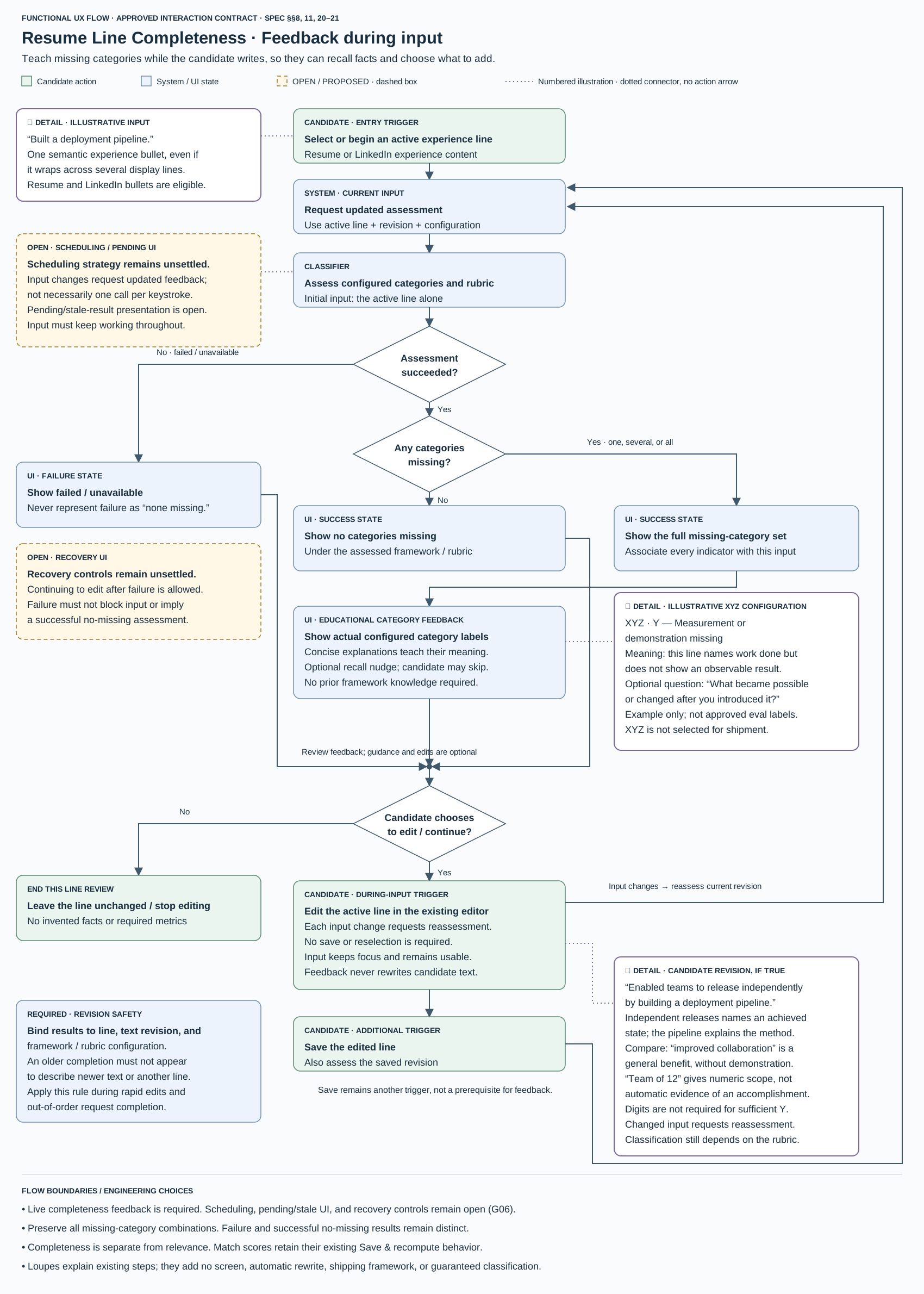
Open the process flow at full size ↗
The flow connects candidate actions, assessment, educational feedback, and the writing loop. Completeness updates without a save or reselection. Matching keeps its separate Save & recompute interaction. Each result stays attached to the line and revision it describes as the candidate continues editing.
16. Product principles
| Principle | Design decision |
|---|---|
| Keep the relationship visible | Posting, document, and intersection stay together while editing. |
| Make change legible | Show the selected-pair and overall score changes beside the revised text. |
| Support recall in the writing flow | Use concise category explanations and optional questions without taking focus. |
| Teach through the work | Explain action, context, method, and outcome using the candidate’s active line. |
| Give the candidate control | Offer selectable suggestions and keep editing, guidance, and revision choices in their hands. |
Jev supplies fast, structured category classification so feedback can accompany writing. The question is which information categories the active line expresses; short explanations and recall prompts translate that decision into useful guidance.
The candidate’s own AI agent handles open-ended writing assistance. Running locally, RoughPatch provides the scoring context and preview tools that make edits inspectable. That division keeps the document central and lets candidates work with the agent they already use.
18. Success metrics
The central measure is completed tailoring sessions with candidate-approved application text. Alongside completion and time to completion, assess whether candidates add useful context, understand the feedback, and can explain the experience in their finished application.
For completeness feedback, measure classification agreement with human-reviewed examples, false missing-category indications, missed omissions, and the delay from an edit to visible feedback. Observe whether people can keep writing, understand a category, and decide what to add without losing their train of thought.
These measures show whether the feedback is accurate, arrives quickly enough to support writing, and helps candidates give a fuller account of relevant work.
24. Positioning statement
For candidates who use AI agents in daily work, RoughPatch is a local workspace for tailoring résumé and LinkedIn experience to a specific job. Requirement-level matching, feedback during writing, and agent-assisted revision help them develop a clearer account of their contribution.